Slim Matte Leather Tablet Sleeve for iPad Protection

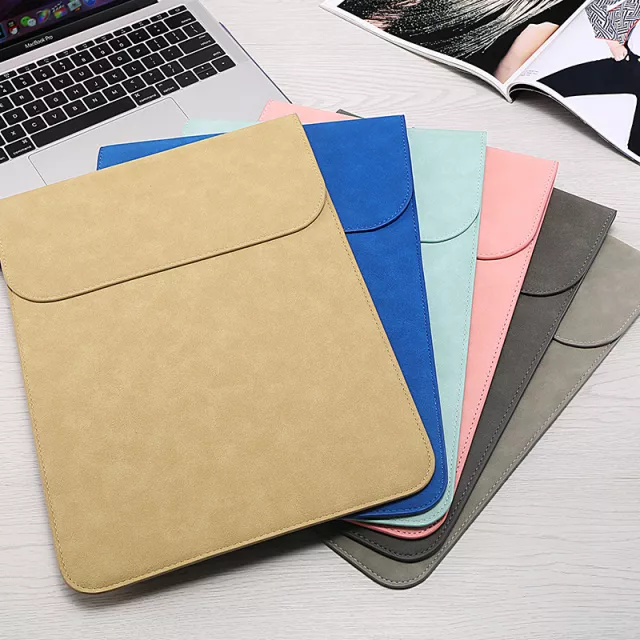
Leather Matte Tablet Sleeve Case for Apple iPad and More: Slim Protection for Everyday Carry
A tablet sleeve should protect against scratches and bumps without adding bulk or looking overly technical. This leather-look matte sleeve is designed for Apple iPad and other similarly sized tablets, offering a clean profile that slides easily into backpacks, totes, and briefcases while keeping your device covered during commutes, campus days, and travel.
What This Sleeve Is Made to Do
- Helps reduce scuffs, surface scratches, and minor bumps during daily carry.
- Matte exterior keeps a low-shine look that pairs well with casual or professional settings.
- Sleeve format keeps the tablet protected without adding a hard-shell footprint.
- Works well as an extra layer inside a larger bag for better device separation.
Design Details That Matter Day to Day
- Matte finish is easier to keep looking clean than glossy materials that show fingerprints quickly.
- Low-profile shape fits into tight backpack compartments and crowded travel bags.
- Simple sleeve styling supports quick in-and-out access at desks, cafes, and security checkpoints.
- Leather-look exterior provides a classic aesthetic without a rugged, tactical feel.
For everyday carry, small differences add up. A sleeve that stays slim means you’re more likely to actually use it—especially when you’re moving between meetings, classes, or terminals and don’t want to reconfigure your bag. The understated matte look also blends into work environments where bright colors or shiny finishes can feel out of place.
Size and Fit: Getting the Right Match
- Measure tablet height, width, and thickness (including any attached accessories) before selecting a sleeve size.
- If a keyboard case is used, confirm overall thickness—sleeves that fit a bare tablet may be snug with a keyboard cover.
- A good fit should slide in smoothly without forcing corners, while still feeling secure once inserted.
- Leave room for a thin screen protector without changing fit dramatically.
Quick Fit Checklist for Tablets
| What to check | How to confirm | Why it matters |
|---|---|---|
| Overall dimensions | Compare tablet measurements to sleeve capacity | Prevents tight corners and stress on edges |
| Thickness with accessories | Measure with any case/keyboard attached | Avoids bulging and zipper/closure strain |
| Charging cable storage needs | Decide if cables go inside sleeve or bag pocket | Keeps sleeve slim and tablet scratch-free |
| Use environment | Commute, school, travel, office | Helps decide if a sleeve-only solution is sufficient |
If you’re shopping specifically for an iPad, confirming the exact model can help avoid fit surprises—especially across different generations where dimensions vary slightly. Apple’s guides can help you confirm your model and specs: Apple Support: Identify your iPad model and Apple Support: iPad technical specifications.
Protection and Handling: What a Sleeve Covers Best
- Best for protecting against everyday abrasion from keys, pens, and bag hardware.
- Adds a barrier between the tablet and rough fabrics or abrasive surfaces inside a backpack.
- Helps reduce cosmetic wear when placing the tablet on desks or shared surfaces.
- For frequent drops or outdoor use, pair with a more impact-focused tablet case and use the sleeve for transport.
A sleeve shines during transport: sliding in and out of bags, being set down on café counters, or sitting next to notebooks and chargers. If your routine includes lots of standing use (warehouse floors, field work, or fast-paced environments), a drop-focused case can handle impacts while the sleeve handles the “bag life” that causes most scuffs and surface wear.
When This Sleeve Makes the Most Sense
- Students carrying tablets between classes who want a simple, lightweight layer.
- Office commuters who want a refined look that fits into a work bag.
- Travelers using the sleeve as a protective divider inside carry-ons.
- Anyone who prefers minimal bulk over heavy-duty armor.
It’s also a smart pick if you rotate bags. Instead of buying multiple device compartments or dedicated laptop-tablet hybrids, a slim sleeve can move from backpack to tote to briefcase and keep the same “grab-and-go” setup.
Care Tips for a Matte Leather-Look Sleeve
- Wipe the exterior with a soft, slightly damp cloth; avoid harsh cleaners that can alter the finish.
- Keep sharp objects (keys, metal tools) out of the same compartment to reduce rubbing marks.
- Let the sleeve air out if exposed to moisture; avoid direct heat sources that can warp materials.
- Store flat when possible to keep edges and corners looking crisp.
For long-term looks, the biggest habit is separation: keep metal items in a different pocket, and avoid stacking the sleeve under heavy objects that can press hard corners into the tablet’s edges.
Featured Picks In Stock
- Leather Matte Tablet Sleeve Case for Apple iPad and More (USD 19.51) — a slim matte sleeve designed for iPad and similarly sized tablets, with a clean, understated style suited for daily carry and professional settings.
- Men’s Genuine Leather Cowboy Belt with Copper Buckle for Jeans (USD 72.51) — a classic leather accessory that pairs well with everyday carry and workwear for a pulled-together look.
Leather Matte Tablet Sleeve Case for Apple iPad and More
FAQ
Will this sleeve fit an iPad with a keyboard case?
It depends on the combined thickness and dimensions. Measure the iPad with the keyboard case attached and compare to the sleeve’s capacity; sleeves that fit a bare tablet can be too snug with keyboard covers.
Does a tablet sleeve protect from drops?
A sleeve helps with scratches and minor bumps during transport, but it is not a substitute for a rugged drop-rated case. For frequent drop risk, use a protective case plus the sleeve for carrying.
How should a tablet fit inside a sleeve?
The tablet should slide in without forcing the corners, sit securely without excessive wiggle, and allow removal without snagging. If it feels tight when inserting, size up or remove bulky accessories.














Leave a comment