Clear iPad Case with Pencil Holder: Slim Protection
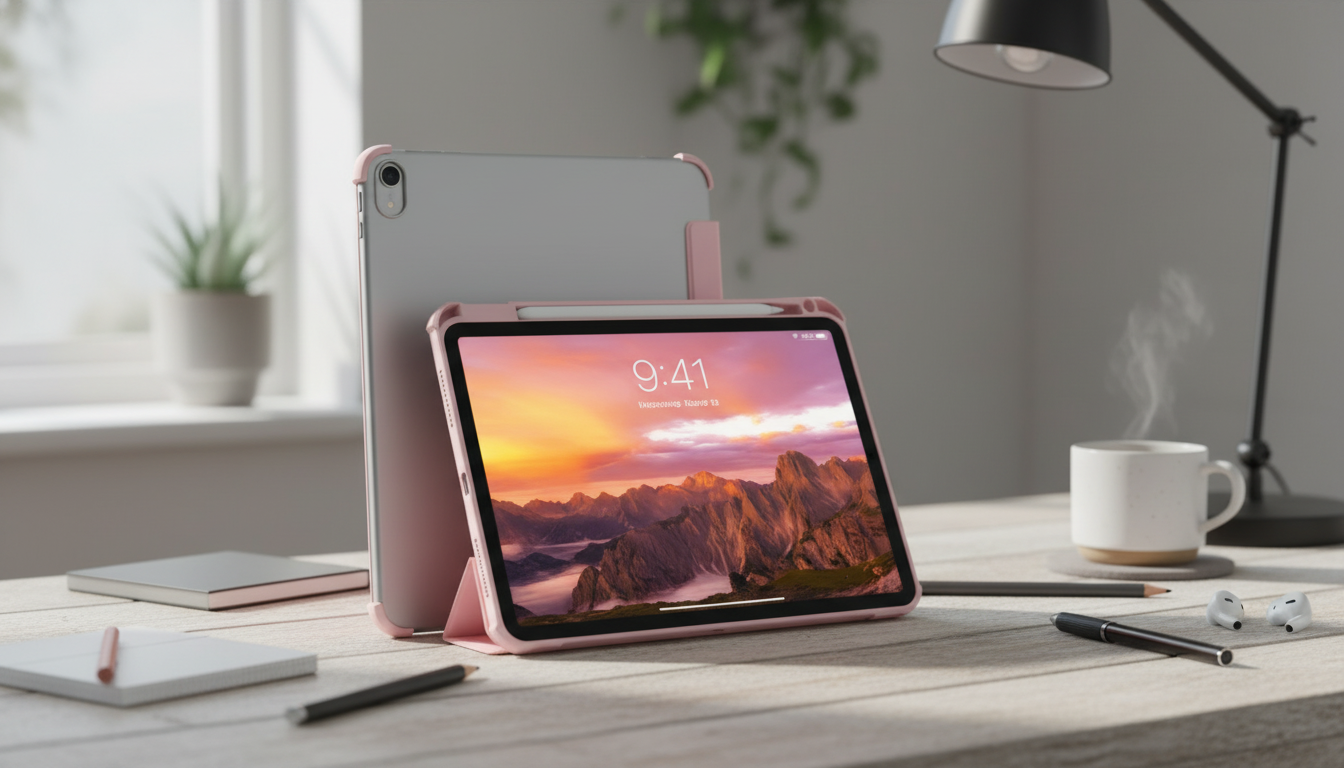
Protective iPad Case with Pencil Holder and Clear Back for Apple iPad
A protective iPad case that keeps your Apple Pencil close and shows off your iPad’s design can make daily use simpler—whether it’s for school, work, or travel. This style combines a clear back panel for visibility with a dedicated pencil holder to reduce the chance of drops, scuffs, and lost accessories.
What this case style is designed to do
A clear-back iPad case with a pencil holder is built for everyday reliability, not bulk. It focuses on the most common pain points—minor drops, bag abrasion, slippery handling, and the “where did my stylus go?” problem.
- Add everyday protection against scratches, bumps, and light drops
- Keep a pencil/stylus stored in a dedicated holder so it’s easier to grab on the go
- Maintain the look of the iPad with a transparent back
- Improve grip compared with holding a bare iPad
Even a slim case can make a noticeable difference when you’re setting your iPad down on café tables, sliding it in and out of a backpack, or using it one-handed while standing.
Clear back: protection without hiding the iPad
One of the biggest reasons people choose a clear-back case is simple: the iPad still looks like an iPad. You keep the color, the Apple logo, and that clean, minimal aesthetic—while adding a protective layer between your device and the real world.
- A clear back helps keep the iPad’s color and Apple logo visible while adding a protective layer
- Useful for shared devices: asset tags or labels on the iPad remain readable
- A transparent back can make it easier to spot dust or debris before it causes scuffs
That last point matters more than it sounds. Tiny grains of dust trapped between a case and the iPad can act like sandpaper over time. With a clear back, it’s easier to notice and wipe away debris before it leaves micro-scratches.
Pencil holder: fewer misplaced styluses
If you use an Apple Pencil (or similar stylus), a holder isn’t just a convenience—it’s a routine. Instead of relying on pockets, desk surfaces, or the bottom of a tote, you’ll have one consistent storage spot every time.
- A built-in pencil holder creates a consistent storage spot instead of tossing the pencil into a bag
- Helps reduce rolling-off-desk accidents by keeping the pencil attached to the iPad
- Convenient for note-taking, sketching, and marking up PDFs when switching between typing and writing
For students and commuters especially, the difference is noticeable: you can pull out your iPad and stylus together, start writing immediately, and pack up faster without leaving accessories behind.
Fit and compatibility checks before buying
iPads can look similar from the front, but generations and sizes often differ in camera placement, speaker holes, and button/port layouts. A quick check before ordering helps you avoid awkward alignment or a case that simply won’t snap on correctly.
Quick compatibility checklist
| What to verify | Why it matters | How to check fast |
|---|---|---|
| Exact iPad model (generation) | Ensures proper camera/port/button alignment | Use the model number from Settings > General > About |
| Screen size (e.g., 10.2-inch, 10.9-inch) | Prevents loose fit or blocked edges | Confirm size on Apple’s specs page for the model |
| Pencil/stylus version fit | Avoids a holder that’s too tight/loose | Compare pencil dimensions and the holder opening |
| Charging method (USB‑C/Lightning) clearance | Ensures cables and adapters fit without stress | Check the port cutout width and depth |
If you’re unsure of the exact model, Apple explains how to identify it by model number: Identify your iPad model. For Apple Pencil pairing and support by iPad generation, see: Apple Pencil compatibility.
Everyday use scenarios
This case style fits naturally into daily routines because it’s designed around quick transitions—typing to writing, desk to backpack, home to classroom.
- Students: keep the pencil attached for quick note-taking between classes
- Work and travel: protect the back from desk grit and bag abrasion while keeping a clean look
- Home use: reduce minor scuffs from countertops and tablet stands
- Shared households: easier to keep accessories together and avoid “missing pencil” moments
If your iPad is often handed off—kids using it for homework, a shared family device, or a work iPad used across shifts—the clear back also makes labels and ID tags easier to see at a glance.
Care tips to keep a clear case looking clean
Clear cases tend to show fingerprints and dust faster than opaque finishes, but a simple routine keeps them looking sharp.
Product snapshot
- Product: Protective iPad Case with Pencil Holder and Clear Back for Apple iPad
- Price: $10.51 (USD)
- Availability: In stock
- Best for: users who want a protective shell with visible back design and a dedicated pencil storage spot
You may also like (in stock)
- Men’s Genuine Leather Cowboy Belt with Copper Buckle for Jeans
- Large Dog Slicker Brush & Comb Set for Doodles, Poodles and Long Coats
FAQ
How do I find my iPad model to make sure the case fits?
Open Settings, tap General, then About, and look for the model number entry. You can match that model number to Apple’s iPad model list to confirm the correct generation and size before ordering.
Will a case with a pencil holder work with Apple Pencil?
It can, but fit depends on your iPad generation and which Apple Pencil version you use. Verify that your iPad supports your Apple Pencil model and check that the holder’s opening matches the pencil’s dimensions.
How do I keep a clear iPad case from looking dirty over time?
Wipe it regularly with a microfiber cloth, and occasionally remove the case to clean any dust trapped between the case and iPad. If needed, wash with mild soap and water, then let everything dry completely before putting it back on.














Leave a comment