Best Vertical Mouse for Mac: Ergonomic Wireless Pick
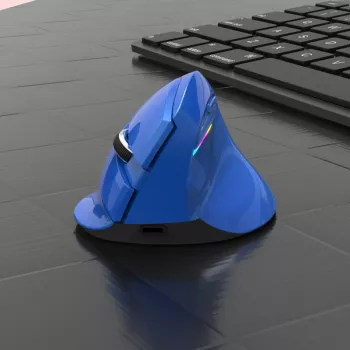
Ergonomic Wireless Vertical Mouse for Apple: Comfort, Control, and Clean Desk Setup
A vertical mouse can reduce forearm twisting compared with a traditional flat mouse, helping many Mac users stay more comfortable during long work sessions. Whether you’re juggling tabs on a MacBook, editing in a creative app on an iMac, or navigating an iPad setup with a keyboard, the right ergonomic wireless vertical mouse can make everyday work feel smoother—without turning your desk into a cable jungle.
Why a Vertical Mouse Feels Different
Traditional mice keep your palm facing down, which can encourage more forearm pronation (a “twisted” position) over time. Vertical designs rotate the grip so your hand sits in a more neutral, handshake-like posture.
- Vertical designs place the hand in a more handshake-like position, which may reduce forearm pronation compared with a standard mouse.
- Many users notice less wrist pressure during scrolling, clicking, and drag-and-drop tasks.
- A short adjustment period is common as the hand learns the new angle and grip.
That adjustment is normal. Expect a few days of “relearning” small tasks like selecting text precisely or doing quick cursor flicks. After that, many people find the vertical grip feels more natural—especially for email, documents, spreadsheets, and general browsing.
What to Check Before Buying for Mac, MacBook, and iPad
Apple devices usually handle mice well, but the details matter—especially around ports, pairing, and how extra buttons behave on macOS.
- Connection type: confirm whether the mouse uses Bluetooth, a USB receiver (2.4 GHz), or both, and make sure the Mac has the right port access (USB-A vs USB-C via adapter/hub).
- macOS compatibility: basic pointing and clicking usually works without drivers, but advanced buttons or DPI switching may depend on the mouse’s built-in behavior or optional software.
- Hand size and grip: vertical mice vary in height and palm support; a size mismatch can cause finger strain or awkward clicking angles.
- DPI levels: higher DPI can reduce the distance the hand travels across a desk, which some users find more comfortable for repetitive work.
- Battery and charging: consider rechargeable vs replaceable batteries and whether the mouse can be used while charging.
| Need | Why it matters | What to choose |
|---|---|---|
| MacBook with USB-C only | USB-A receivers won’t plug in directly | Bluetooth mouse or receiver + USB-C adapter/hub |
| Shared Mac + iPad use | Pairing convenience across devices | Bluetooth with easy re-pairing; consider multi-device switching if offered |
| Precision work (design, spreadsheets) | Cursor control and speed tuning | Multiple DPI options and a stable sensor |
| Long workdays | Comfort over time | Full palm support, light click force, reliable scroll wheel |
Featured Option: Ergonomic Wireless Vertical Mouse for Apple
If your priority is a cleaner desk plus a more relaxed hand position, a wireless vertical mouse is a practical daily driver for Mac workflows.
- Designed to support a more natural hand posture while keeping a wireless setup for a cleaner desk.
- A practical match for Mac users who want a comfortable daily driver for browsing, office work, and general productivity.
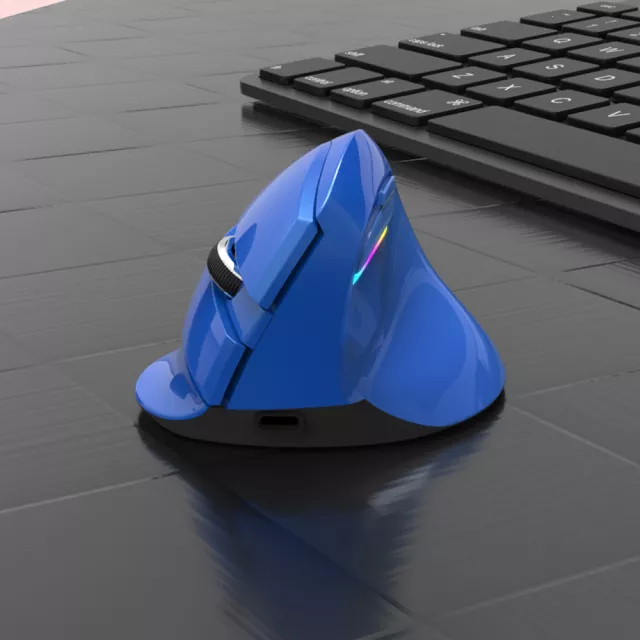
- Before buying, review product images to confirm the shape, button layout, and color match for your Mac workspace.
| Product | Price | Availability |
|---|---|---|
| Ergonomic Wireless Vertical Mouse for Apple | $46.67 | In stock |
Setup on macOS: Pairing and Basic Tweaks
Most vertical mice work right away on macOS for the basics—move, click, right-click, and scroll. The goal is to pair quickly, then make a few small adjustments so the cursor feels predictable.
- Bluetooth pairing: open System Settings → Bluetooth, put the mouse into pairing mode, then select it to connect. Apple’s step-by-step guide is here: Apple Support: Connect a Bluetooth device with your Mac.
- Receiver pairing: insert the USB receiver (use a USB-C adapter if needed) and confirm the cursor responds immediately.
- Adjust tracking speed: System Settings → Mouse → Tracking speed to match desk space and preference.
- Enable secondary click: confirm right-click behavior and test in Finder for context menus.
- Scrolling feel: if scrolling is too fast/slow, try macOS scrolling settings or mouse-specific toggles if available.
If you use a large external display, bumping tracking speed slightly can reduce the distance your hand travels. If you prefer precision (photo edits, cells in spreadsheets), lower it and rely on deliberate arm movement.
Using a Vertical Mouse Comfortably (Without Overthinking It)
A vertical mouse helps most when it’s paired with relaxed technique. The shape should support your hand—your job is to avoid fighting it.
For broader workstation guidance, resources like OSHA’s Computer Workstations eTool and NIOSH ergonomics information provide practical, non-product-specific tips.
Common Issues and Quick Fixes
Who This Style of Mouse Tends to Suit Best
More In-Stock Picks (Optional Add-Ons)
- Men’s Genuine Leather Cowboy Belt with Copper Buckle for Jeans
- Large Dog Slicker Brush & Comb Set for Doodles, Poodles and Long Coats
FAQ
Does a vertical mouse work with Mac without installing software?
In most cases, yes—basic pointer movement, left/right click, and scrolling typically work over Bluetooth or a USB receiver without installing anything. Extra buttons or advanced customization may depend on the mouse’s built-in functions or optional utilities.
Is a vertical mouse better for wrist pain?
Many people find the handshake-style grip more comfortable because it may reduce forearm twisting compared with a flat mouse. Comfort still depends on your overall workstation setup and taking breaks, and it’s not a medical guarantee.
Can a vertical mouse connect to a MacBook with only USB-C ports?
Yes—Bluetooth is usually the simplest option for USB-C-only MacBooks. If the mouse uses a USB-A receiver, you’ll need a USB-C adapter or hub to plug the receiver in.















Leave a comment