256×192 Thermal Monocular: Fast Night Scanning Guide
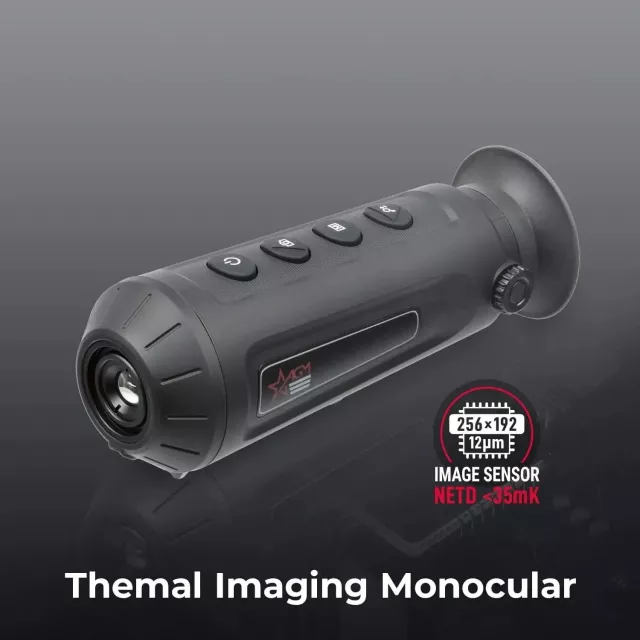
Thermal Monocular High-Powered Imaging Device with 256×192 Resolution
A high-powered thermal monocular helps spot heat signatures in darkness, brush, fog, and other low-visibility conditions. With a 256×192 thermal sensor, this device is built for fast scanning, practical identification at short-to-mid ranges, and simple handheld use for outdoor and professional scenarios.
What a Thermal Monocular Shows (and What It Doesn’t)
Thermal imaging doesn’t work like a standard camera or night-vision optic. Instead of relying on visible light, it visualizes temperature differences—so living things, recently used vehicles, and warm equipment can stand out even when it’s pitch-black.
- Displays heat differences rather than visible light, making warm objects stand out against cooler backgrounds.
- Useful when ambient light is limited or changing quickly (night, deep shade, dawn/dusk).
- Cannot see through solid objects like walls; glass can be challenging because it reflects infrared energy.
- Best results come from understanding how weather, terrain, and materials affect apparent temperature.
For a quick, trustworthy foundation on how thermal imaging works, see FLIR Systems — Thermal imaging basics and background on infrared radiation.
Core Imaging Specs That Matter for Real-World Use
Spec sheets can be confusing, but a few key items have an outsized impact on what you’ll actually see while scanning a tree line, checking a driveway, or sweeping across a hillside.
- 256×192 thermal resolution: determines how much detail is available when observing smaller targets or distinguishing shapes.
- Lens and digital zoom: affects how large a target appears and how much image quality is retained as magnification increases.
- Refresh rate and processing: helps keep scanning smooth, especially when panning or tracking movement.
- Color palettes: multiple heat-color modes can improve contrast in different environments (woods, open fields, urban areas).
- Focus style: fixed focus is quick for scanning; adjustable focus helps sharpen objects at varying distances.
How common thermal specs affect what you can see
| Spec | What it changes | Why it matters outdoors |
|---|---|---|
| Thermal resolution (256×192) | Fine detail and target separation | Improves confidence when distinguishing animals/people from background clutter |
| Field of view (FOV) | How wide the scene looks | Wider FOV scans faster; narrower FOV can help focus on distant areas |
| Refresh rate | Smoothness during movement | Reduces blur when panning and makes tracking easier |
| Color palettes | Contrast and visibility of hot/cold zones | Helps spot targets in rain, brush, or mixed-temperature scenes |
| Detection vs identification | Spotting presence vs confirming shape | A device may detect far away but identify reliably at shorter ranges |
Where a 256×192 Thermal Monocular Fits Best
A 256×192 unit is a practical sweet spot for users who want meaningful thermal capability in a compact, handheld format—especially when the goal is fast awareness and efficient scanning rather than long-distance, fine-detail confirmation.
- Property checks: quickly scan fence lines, outbuildings, and driveways after dark.
- Outdoor navigation: detect warm-blooded wildlife presence before approaching an area.
- Search support: identify heat signatures in brush or uneven terrain when visibility is limited.
- Camping and overlanding: spot animals near campsites and verify surroundings without bright lights.
- Equipment checks: locate abnormal heat on gear or systems where overheating might be a concern (use caution and follow safety guidance).
Weather still plays a role. Fog, humidity, rain, and rapidly changing temperatures can reduce range and contrast; NOAA’s overview of how fog affects visibility is a helpful reference point when planning night use.
Handling, Battery, and Field Practicality
Thermal performance matters, but so does how quickly the device fits into real routines—grab, power on, scan, and put away. Small ergonomic differences can determine whether a monocular gets used daily or sits in a case.
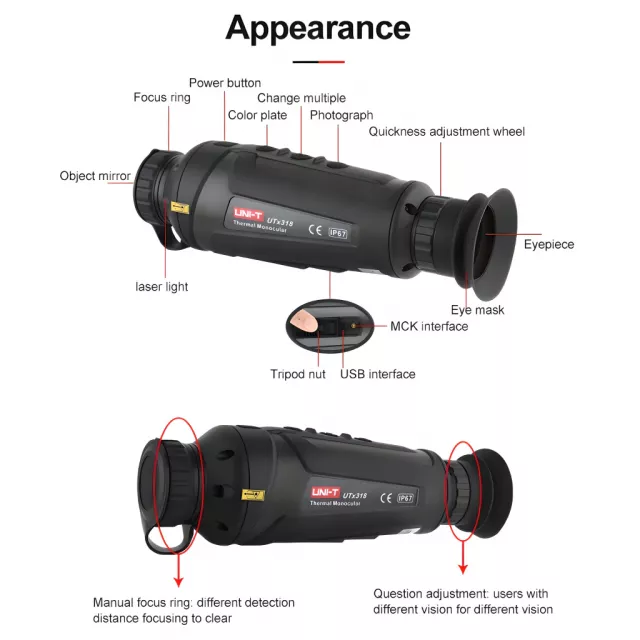
- Ergonomics: a monocular should be comfortable for one-hand scanning and quick repositioning.
- Button layout: intuitive controls help when wearing gloves or operating in the dark.
- Power management: consider typical runtime, charging method, and whether spare power options are practical.
- Startup time: faster boot and wake times are helpful for quick checks.
- Durability: look for impact resistance and weather protection suited to the environments where it will be used.
Getting Clearer Views: Setup Tips and Common Mistakes
Care, Storage, and Safe Use
Product Snapshot: Thermal Monocular High-Powered Imaging Device (256×192)
If the goal is a straightforward, handheld thermal tool for night scanning and general heat awareness, Thermal Monocular High-Powered Imaging Device with 256×192 Resolution delivers practical detail in a compact format—well suited to checking open areas, brush lines, and the edges of properties without relying on visible light.
At-a-glance details
| Item | Details |
|---|---|
| Product | Thermal Monocular High-Powered Imaging Device with 256×192 Resolution |
| Availability | In stock |
| Price | 963.95 USD |
| Category | Advanced Technologies |
Other In-Stock Picks Worth Adding to an Outdoor Loadout
- Men’s Genuine Leather Cowboy Belt with Copper Buckle for Jeans for sturdy, daily carry support when you’re on the move.
- Large Dog Slicker Brush & Comb Set for Doodles, Poodles and Long Coats to keep a trail or campsite companion more comfortable after brushy walks.
FAQ
Is 256×192 thermal resolution enough for outdoor use?
It can be very effective for detection and general recognition at practical distances, especially for scanning and situational awareness. Higher resolutions typically provide more detail for confident identification at longer ranges, so it’s important to pair resolution with the lens/FOV and keep expectations realistic.
Can a thermal monocular see through fog, smoke, or glass?
Thermal often performs better than visible light in light fog or haze, but dense fog and heavy rain can still reduce range and contrast. Glass commonly reflects infrared energy, so viewing through windows is often unreliable.
What’s the difference between detecting something and identifying it?
Detection means noticing a heat signature is present, while identification means confidently determining what it is. Identification usually requires closer distance, steadier viewing, and more image detail than detection alone.













Leave a comment