5.8G Low-Latency Wireless Gaming Headset w/ Mic
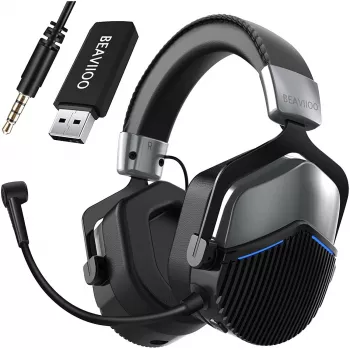
Wireless Gaming Headset 5.8G Ultra-Low Latency Noise Cancelling with Mic
A responsive wireless connection, clear team chat, and effective noise control can make the difference between reacting on time and reacting late. This headset centers on an ultra-low latency 5.8G wireless link, paired with noise cancelling that helps keep game audio cleaner and a microphone tuned for in-game communication. For players who are tired of “laggy” wireless sound, it’s designed to feel closer to a wired setup—without the cable.
What Makes a Low-Latency Wireless Headset Feel “Instant”
Latency is the small delay between an on-screen action and when you hear it. Even when the delay is measured in milliseconds, fast games make it obvious—especially when timing matters.
- Where delay shows up most: directional footsteps, reload and ability cues, rhythm timing, and rapid callouts where the audio should match the moment.
- Why a dedicated receiver can feel faster: headsets using a dedicated dongle connection (often in the 2.4G/5.8G family) are typically optimized for steadier throughput than standard Bluetooth audio modes, which can prioritize compatibility over responsiveness.
- Stability factors that shape “instant” feel: nearby interference, distance from the receiver, walls/floors between you and the source, and other competing wireless devices.
If you’ve ever heard footsteps a fraction late or noticed your gunfire “echo” behind the action, reducing wireless delay is one of the fastest ways to make a headset feel more competitive.
5.8G Wireless Connection: Speed, Separation, and Range Expectations
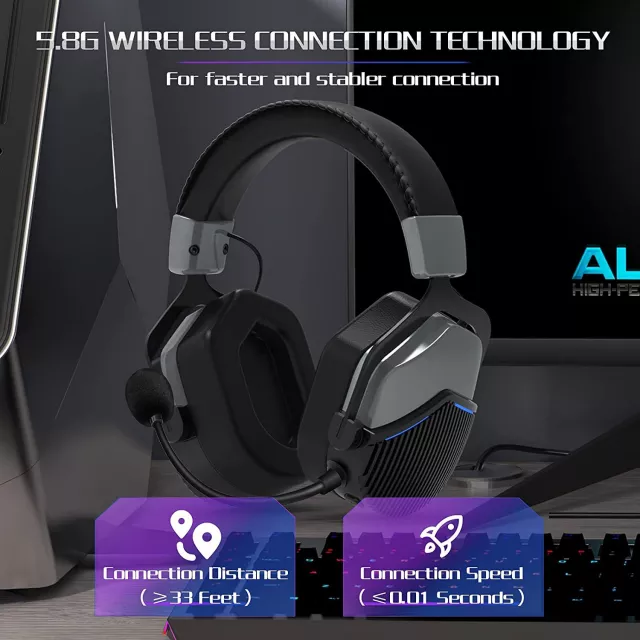
A 5.8 GHz wireless link can be useful in busy homes where the 2.4 GHz band is crowded with routers, smart devices, and controllers. While every room is different, better separation from congestion can translate to fewer hiccups and more consistent audio delivery.
For best-case performance, keep a relatively clear line of sight between the transmitter/receiver and the headset. In the real world, reception can be affected by Wi‑Fi routers, USB 3.0 hubs, metal desks, PC cases tucked under a table, and even where the receiver sits behind a monitor.
A practical improvement that takes seconds: plug the receiver into a front USB port, or use a short extension cable to move it into a more open spot.
Quick Setup Checklist for a Clean Wireless Link
| Step | What to do | Why it helps |
|---|---|---|
| 1 | Plug the wireless receiver into a front USB port (or use a short USB extension). | Reduces shielding and improves signal stability. |
| 2 | Keep the receiver away from Wi‑Fi routers and USB 3.0 devices. | Limits interference that can cause dropouts or added delay. |
| 3 | Set game audio to “Headphones” and enable spatial audio only if it stays clear. | Prevents muddy positioning and keeps directional cues sharp. |
| 4 | Do a 30‑second mic test in the platform’s voice settings. | Confirms levels and noise control before matches. |
Noise Cancelling: What It Improves for Gaming and Calls
Noise control isn’t just about “silence”—it’s about separation. When background distractions are reduced, smaller details like distant footsteps, pings, and reload cues are easier to catch without raising volume to uncomfortable levels.
- Playback noise control: helps lower steady background noise so in-game details stand out more clearly.
- Mic noise reduction: can make your voice easier to understand for teammates when you’re in a busy room or shared space.
- Common limitations: sharp sounds (like sudden yelling, a dropped controller, or a loud mechanical keyboard) may still cut through depending on positioning and how the noise control is tuned.
- Fit matters: a solid seal around the ears typically improves perceived noise reduction and bass response, which can also help positional cues feel more distinct.
For safer long sessions, it’s still smart to keep listening levels reasonable. The World Health Organization’s safe listening guidance is a helpful reference for protecting hearing over time: https://www.who.int/health-topics/hearing-loss.
Microphone Clarity for Team Chat and Streaming
A gaming mic doesn’t need to sound like a studio broadcast to be effective—it needs to be intelligible under pressure. Clear mids, controlled “P” and “B” bursts, and steady output volume matter more than heavy processing.
If you need a quick troubleshooting path for PC audio routing, Microsoft’s Windows sound settings guide can help you verify outputs/inputs: https://support.microsoft.com/windows/fix-sound-or-audio-problems-in-windows-73025246-b61c-40fb-671a-2535c7cd56c8.
Comfort and Controls That Matter in Long Sessions
Because wireless headsets are radio devices, it’s reasonable to follow general consumer RF safety guidance from regulators such as the FCC: https://www.fcc.gov/engineering-technology/electromagnetic-compatibility-division/radio-frequency-safety/faq/rf-safety.
Specs and Highlights
Product Snapshot
| Item | Details |
|---|---|
| Product name | Wireless Gaming Headset 5.8G Ultra-Low Latency Noise Cancelling with Mic |
| Price | 44.97 USD |
| Availability | In stock |
| Category | Gadgets |
In-Stock Picks (Quick Links)
- Wireless Gaming Headset 5.8G Ultra-Low Latency Noise Cancelling with Mic
- Men’s Genuine Leather Cowboy Belt with Copper Buckle for Jeans
- Large Dog Slicker Brush & Comb Set for Doodles, Poodles and Long Coats
Who This Headset Fits Best
FAQ
Does a 5.8G wireless headset work differently than Bluetooth for gaming?
Yes. A dedicated wireless receiver connection is typically tuned for steadier performance and lower perceived delay than standard Bluetooth audio profiles, though your room setup and interference can still affect results.
Will noise cancelling block keyboard and background chatter?
It can reduce steady background sounds and improve clarity, but sharp noises like keyboard clicks may still come through. A good ear seal and proper mic placement usually make the biggest difference.
How can mic quality be improved quickly?
Position the mic slightly off-center from your mouth, confirm the correct input device is selected, and run a short level test. Avoid heavy mic boost or overly aggressive noise settings that can add hiss or distort speech.














Leave a comment