Retro Round-Key Wireless Combo: 65% Keyboard + Mouse

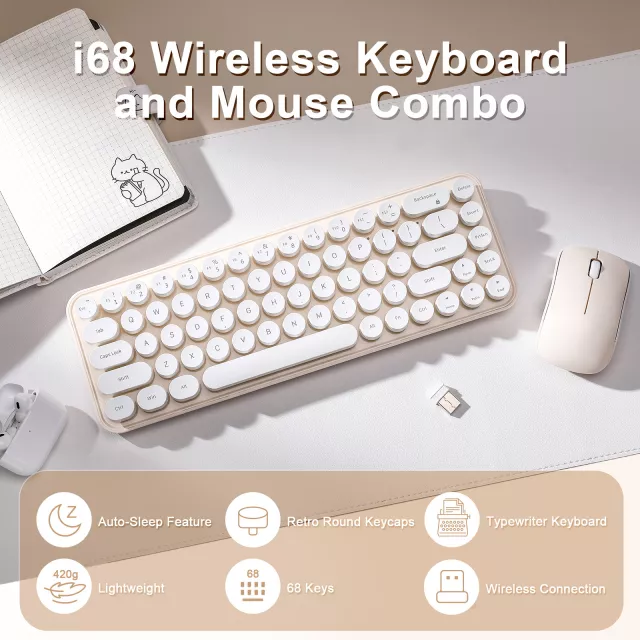
Retro Wireless Keyboard and Mouse Combo with Round Keycaps, Compact 65% Layout
A compact retro-style keyboard and mouse set can tidy a desk setup without giving up everyday comfort. With round keycaps, a 65% footprint, and wireless convenience, this combo fits small workspaces, laptop stands, dorm desks, and shared home offices where cable clutter and oversized keyboards get in the way. The result is a cleaner layout that still feels “complete” for daily writing, schoolwork, browsing, and light productivity.
What makes this combo feel “retro” (and why it’s practical)
Retro design isn’t only about looks—it can shape how a workspace feels and functions. Round keycaps create a typewriter-inspired silhouette that pairs naturally with minimalist setups, warm wood desktops, and vintage desk accessories. Because the keys are visually distinct, many people find the keyboard encourages more deliberate finger placement during casual typing, journaling, or messaging.
A matching mouse matters, too. When the keyboard and mouse share the same style language, the whole desk looks more intentional—helpful if your desk shows up in video calls, streams, or simply sits in a common area of the home. Importantly, “retro” doesn’t have to mean oversized: a compact layout can keep the aesthetic while giving back valuable surface space.
Compact 65% layout: more room for the mouse, less reaching
A 65% keyboard layout is often a sweet spot for everyday use. It typically removes the number pad and tightens the overall footprint while keeping arrow keys for navigation-heavy tasks like editing text, scrolling through documents, or moving around spreadsheets. That extra space to the right can reduce shoulder reach during long sessions—especially on narrow desks, keyboard trays, or dorm surfaces where every inch counts.
Another perk is portability. A 65% board is easier to slide into a backpack alongside a laptop or tablet, making it a practical option for hybrid work, study groups, or travel. And for people who dislike ultra-compact layouts that hide arrow keys behind function layers, the 65% format tends to feel more familiar.
| Feature | Full-size keyboard | Compact 65% layout |
|---|---|---|
| Desk space needed | Highest | Lower—frees space for mousing |
| Number pad | Included | Usually removed |
| Arrow keys | Included | Commonly included |
| Portability | Lower | Higher |
| Best for | Heavy data entry | Everyday work, study, tight desks |
Wireless convenience: clean setup for work, study, and shared spaces
Wireless gear is a simple way to make a desk feel calmer. A wireless keyboard and mouse combo reduces visible cable clutter, which makes it easier to wipe down the surface, reposition items, or switch from “work mode” to “off mode” at the end of the day. It’s also useful for laptop-on-stand setups: when the screen is elevated, the keyboard can sit where it’s most comfortable without having to route cords around the stand.
If the keyboard is frequently moved—between a bedroom desk and kitchen table, from dorm to library, or between hot desks at work—wireless flexibility is hard to beat. Connection details can vary by model, so it’s worth matching the connection method to your devices (for example, Bluetooth compatibility and supported profiles can differ by hardware; see the Bluetooth Core Specification for general background).
Typing feel and daily comfort: what to notice with round keycaps
Round keycaps have a distinctive feel. Many people like the way they encourage centered finger placement, but if you’re coming from a flat laptop keyboard, expect a short adjustment period. Over a few days, muscle memory typically adapts, especially if the key spacing is consistent across rows.
With circular caps, stability is especially noticeable on the most-used keys. Look for a steady feel on Space, Enter, and Backspace, and pay attention to how much the keys wobble when pressed off-center. If you type in a quiet room, overall build and switch style can influence noise; a stable plate and well-seated keys often sound less rattly.
For longer sessions, ergonomics still matter more than aesthetics. A compact board can keep your hands closer together, which some users find comfortable. To reduce wrist extension, aim for a neutral wrist angle and consider a wrist rest if you tend to hover or plant your wrists while typing. For additional guidance on workstation comfort, the NIOSH ergonomics resources are a helpful reference point.
Mouse pairing: why a matched mouse matters beyond looks
A bundled mouse isn’t just about matching colors—it can simplify setup. When the mouse is designed to pair with the keyboard, the connection workflow is usually more consistent, which can reduce compatibility surprises and cut down on “why isn’t this connecting?” moments.
Setup and care tips for long-term reliability
Who this set fits best
Shop related in-stock picks
- Retro Wireless Keyboard and Mouse Combo with Round Keycaps, Compact 65% Layout — a space-saving wireless set with a classic round-key look.
- Twin Size Upholstered Bed with LED Lights and Crown Headboard — a dorm- and bedroom-friendly upgrade that pairs well with a coordinated room setup.
FAQ
Does a 65% keyboard still have arrow keys?
Many 65% layouts keep dedicated arrow keys and a small navigation cluster while removing the number pad. Exact placement varies by model, so it’s worth checking the layout image on the product page.
Will a retro round-keycap keyboard feel harder to type on than a laptop keyboard?
It can feel different at first because the key shape and travel aren’t the same as a flat laptop keyboard. After a short adjustment period, many users find the centered feel comfortable, and a wrist rest can help on longer typing days.
What’s the easiest way to clean round keycaps?
Turn the keyboard off, then use a soft brush or compressed air to clear dust around the rims. Wipe with a lightly damp microfiber cloth and avoid excess moisture; if the keyboard supports it, a keycap puller can help with deeper cleaning.













Leave a comment