Triangular Magnetic Aluminum Phone Stand for Streaming
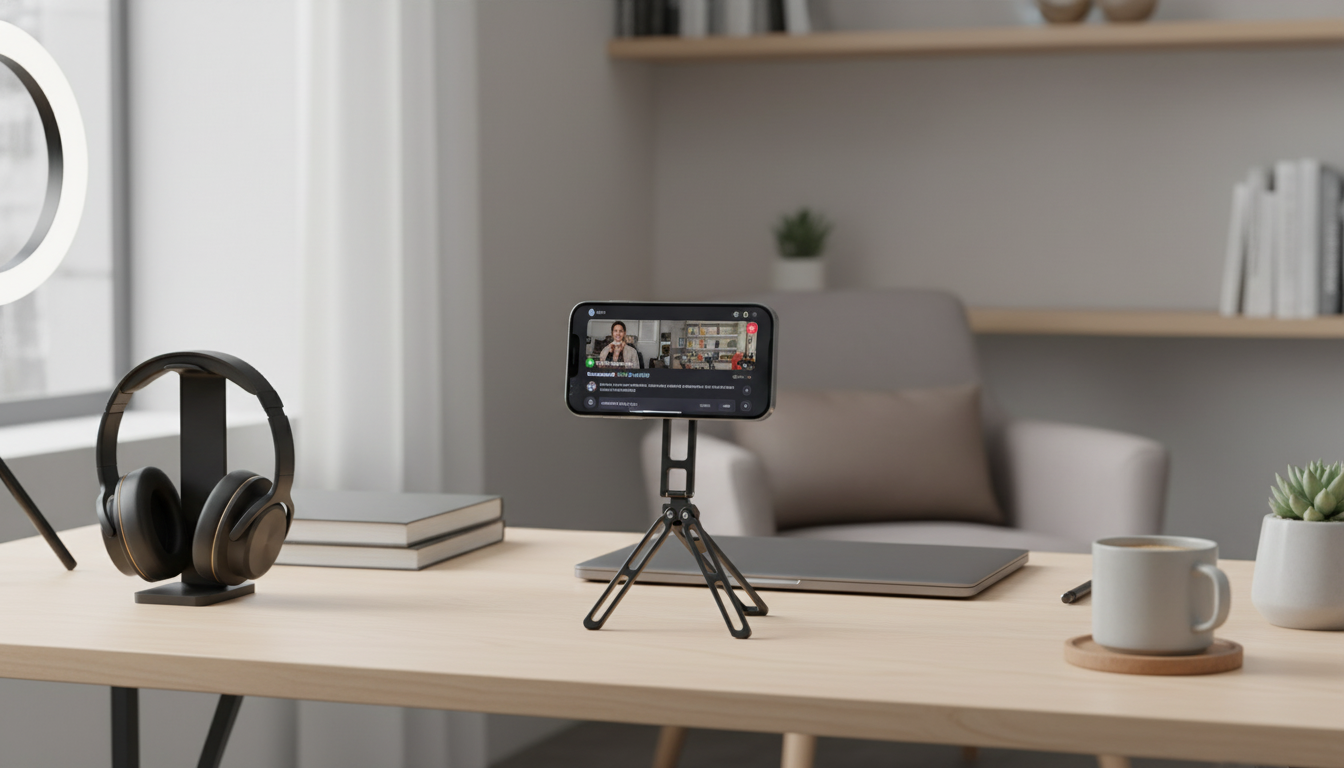
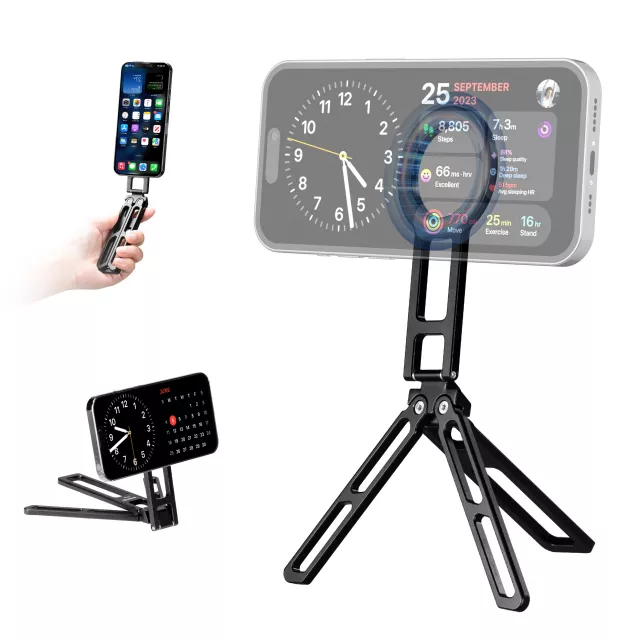
Triangular Magnetic Aluminum Phone Stand for Desk and Streaming
A reliable phone stand can make calls, videos, and live streams feel effortless—especially when it stays put, holds the right angle, and keeps the screen centered on camera. This triangular magnetic aluminum stand is built for desk use and streaming-friendly positioning, combining a stable geometry with a clean metal finish for everyday setups at home, work, or a creator desk.
What Makes a Triangular Stand Different
A triangular phone stand leans on simple geometry to feel more planted during real use. Instead of relying on a narrow “spine” or a tall hinge, the triangular profile distributes weight across a wider footprint—helpful when you tap the screen, get repeated notifications, or adjust framing mid-recording.
- Triangular profile prioritizes stability by distributing weight across a wider base footprint.
- Magnetic attachment supports quick docking and removal without fiddling with clamps.
- Aluminum body aims for a sturdy feel while keeping the desk setup minimal and neat.
- Streaming-friendly positioning is designed to suit both casual viewing and camera-facing use for video calls and live sessions.
If you regularly switch between “pick up and reply” and “hands-free on camera,” magnetic mounting can feel faster than spring clamps—just lift the phone away and return it to the same centered spot.
Materials, Build, and Desk Friendliness
At a desk, small movements add up: typing vibrations, mouse bumps, cable pulls, and quick taps on the phone. An aluminum build helps resist flexing and keeps the stand feeling solid, while the angled triangular frame can help reduce tipping compared with narrow, upright styles.
- Aluminum construction helps resist flexing and wobble during tapping, typing, or notifications.
- Angled triangular frame can help reduce tipping compared with narrow, upright stands.
- Smooth exterior is easy to wipe clean and pairs well with modern desk gear.
- Works well on typical desk surfaces (wood, laminate, metal); consider a mat if the desk is very slick.
Quick Look: Practical Benefits at a Desk
| Feature | Why it matters | Best for |
|---|---|---|
| Triangular base | Improves stability and reduces rocking | Desks used for meetings, classes, and creators who tap the screen often |
| Magnetic hold | Fast one-handed mounting and removal | Frequent pickups during calls or message checks |
| Aluminum body | Solid feel and durable daily use | Workstations and long-term desk setups |
| Streaming-friendly positioning | Helps keep the phone aligned and visible on camera | Live streaming, recording, and video calls |
For general workstation comfort, it also helps to keep screens closer to eye level and reduce neck bend during longer sessions—guidance aligned with ergonomic basics like those outlined in the OSHA Computer Workstations eTool.
Magnetic Hold and Phone Compatibility
Magnetic mounting is most seamless with phones and cases built for magnetic attachment systems (often marketed as MagSafe-compatible). If you’re using an iPhone with MagSafe or a compatible case, the phone typically “finds” the center quickly and stays aligned.
- Magnetic mounting is ideal for phones/cases that support magnetic attachment systems (often marketed as MagSafe-compatible or magnetic ring compatible).
- For non-magnetic phones/cases, a compatible magnetic ring or plate (if used) should be aligned carefully to keep the phone centered and secure.
- Heavier phones or bulky cases may reduce magnetic stability; a slimmer case typically improves hold.
- Keep the contact area free of dust or grit to maintain a consistent connection and reduce surface wear.
If you’re unsure what “MagSafe” covers, Apple’s overview is a helpful reference: Apple Support: About MagSafe.
Angles and Positions for Streaming, Meetings, and Filming
Good framing often comes down to a few repeatable positions. The stand is most useful when it lets you place the phone where a webcam would sit—centered and steady—without blocking your keyboard or cluttering the desk.
- Use a mid-height screen angle for eye-level framing during video calls to reduce the “looking down” effect.
- Portrait orientation generally works better for short-form livestreams; landscape is useful for long recordings or horizontal video platforms.
- Place the stand directly behind a keyboard for centered webcam-like framing, or slightly off-center for over-the-shoulder product shots.
- For overhead desk shots, pair the stand with a raised surface (books/box) only if stability remains solid and the base stays fully supported.
A practical setup for creators: keep the phone in portrait mode for vertical platforms, set the stand about an arm’s length away, and bring the lens closer to eye level by placing the stand slightly back on the desk rather than right at the edge.
Charging and Cable Setup Tips
Charging during a stream or long meeting is common, but cables can introduce torque that nudges the phone off-center. A neat cable path helps maintain alignment—especially when you’re trying to keep the frame consistent.
Everyday Use Cases
Care, Safety, and Best Practices
Shop In-Stock Picks
- Triangular Magnetic Aluminum Phone Stand for Desk and Streaming
- Men’s Genuine Leather Cowboy Belt with Copper Buckle for Jeans
- Large Dog Slicker Brush & Comb Set for Doodles, Poodles and Long Coats
FAQ
Will it work with phones that don’t have built-in magnetic attachment?
It works best with magnetic-compatible phones and cases. For non-magnetic setups, a compatible magnetic ring or plate can be added, but careful alignment and case thickness can affect how secure and centered the phone feels.
Is it stable enough for tapping the screen during a livestream?
The triangular geometry is designed to improve stability and reduce rocking. Real-world steadiness still depends on a flat desk surface, the phone’s weight, and case thickness, so keeping the contact area clean and the base fully supported helps.
Can it be used in both portrait and landscape modes?
Yes—magnetic mounting makes it easy to rotate the phone between portrait and landscape. Portrait is commonly used for vertical streams, while landscape fits horizontal recording or platforms that prefer widescreen video.













Leave a comment